
Sold-out products are a tax on the first screen
A sold-out tile in row one is not “social proof.” It is a dead click on the most expensive real estate you have. Shoppers bounce, paid traffic is wasted, and the product that could have sold is sitting two scrolls down. Shopify will not move it for you.
SortWise treats inventory as a merchandising signal, not a badge you hope people notice. The collection stays shoppable even when sizes, locations, and restocks are moving all day.
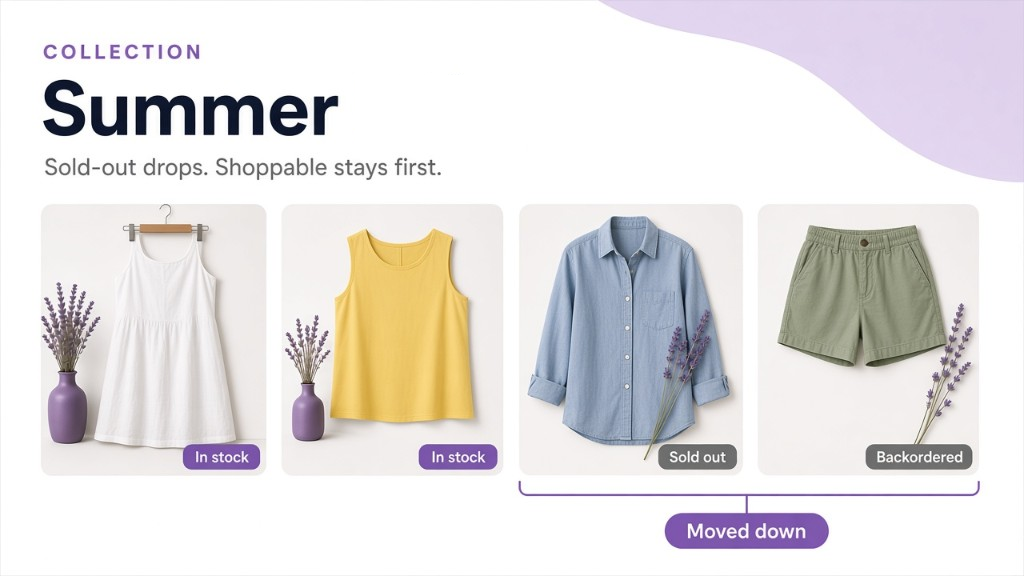
What you can automate
- Push sold-out products down — or hide them from the collection entirely.
- Push down backordered items so a “notify me” SKU does not occupy a hero slot.
- Demote by tag when you need a merchandising hold without deleting the product.
- Sort by inventory level to clear excess stock, or to keep scarce sizes from vanishing on page four.
- Sort by variant availability % so a dress with 1 of 8 sizes left does not outrank a full-size-run hero.
- Sort by back-in-stock date when you want returning inventory to climb as the restock approaches.
Pins can still honor stock: keep a campaign product locked at the top, then automatically drop it when it sells out so the pin does not become a tombstone.
Why this is not the same as “OOS last”
Pushing sold-out products down is only the starting point. The useful inventory logic includes backorders, tags, variant ratios, and restock dates — with those rules still running every hour instead of once a day. Pair inventory rules with multi-location stock when the warehouse the shopper will never see should not decide page one.