
If you cannot measure the sort, you are decorating
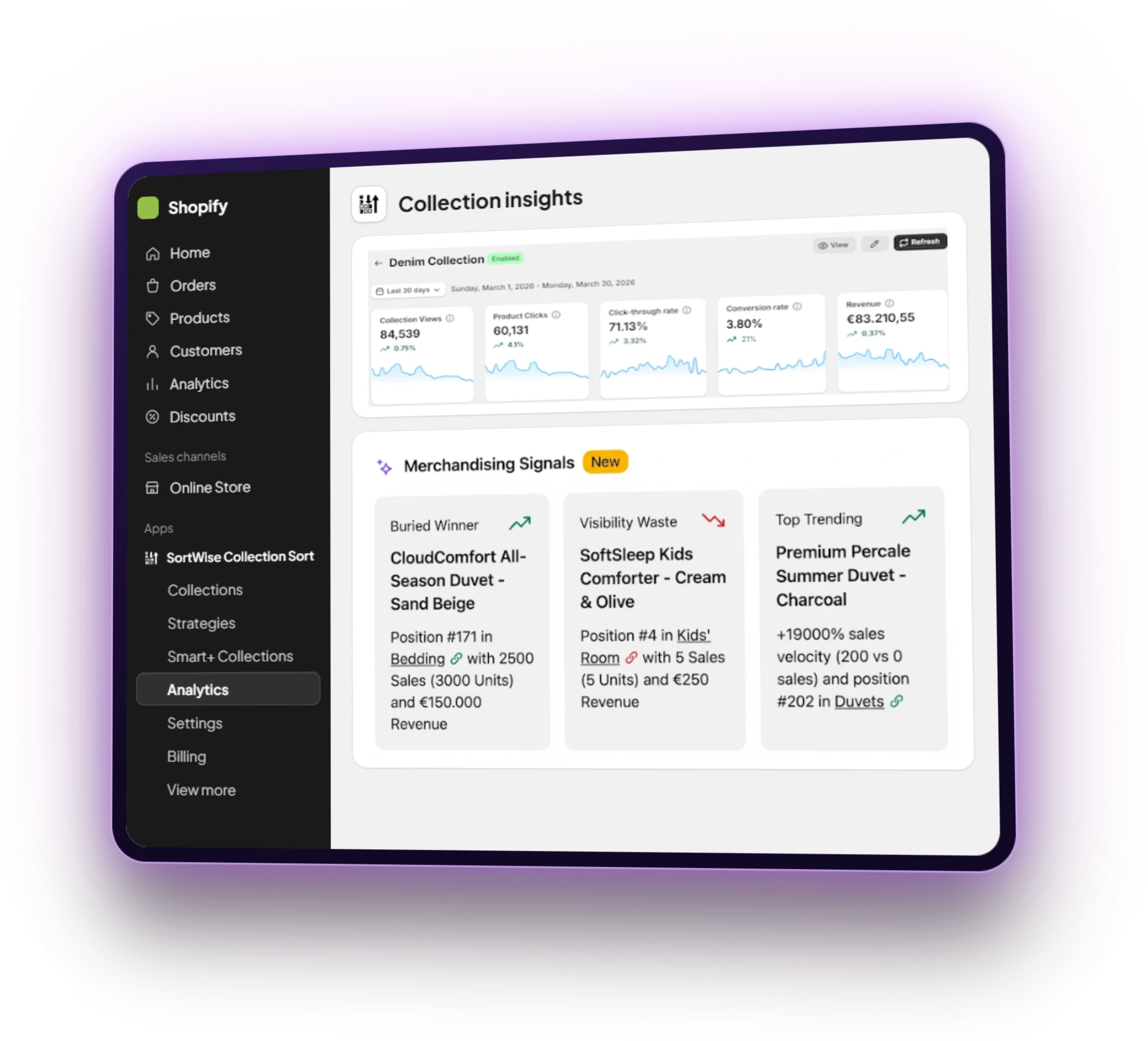
Collection apps love to promise “data-driven merchandising.” Few show you whether the current order is costing money. SortWise ships collection analytics on every plan, including free: how the collection performs, which products earn the click, and which ones occupy the fold without paying rent.
CTR, conversion, and the products you are burying
Track collection-level click-through and conversion so a strategy change is visible. Insights flag buried winners — products converting from row four that belong in row one — and trending items that deserve a temporary boost before the lookback window catches up.
Use a custom sales lookback (7, 14, 30 days) when all-time bestsellers are lying to you. Last season’s hero should not own December because it owned June.
Find the next fix across the store
Global Analytics turns collection reports into a store-wide merchandising queue. See sales velocity, hidden gems, and prime real-estate underperformers alongside the collections doing well and the ones that need a strategy review.
The Performance view compares collections managed by SortWise with collections that are not sorted. That gives you a clearer baseline for the work: which collections are improving, which products deserve visibility, and where the next decision is most likely to matter.
From dashboard to next move
Read the collection. Then give the grid a job.
A useful collection report does more than show a number. It should tell the team what deserves attention, why it matters, and which merchandising control to use next.

A product converting from a low-visibility position may deserve a stronger rank or a temporary boost.
A sold-out or weak product in a valuable slot is a clear reason to push it down, hide it, or replace the pin.
When two commercial choices are plausible, test the strategies on live traffic instead of debating the order.
Visibility waste
Visibility waste is the SortWise-specific metric most roundups skip. It is the products sitting in expensive above-the-fold slots without earning the traffic — a sold-out bestseller, a low-margin filler, a pin nobody clicked. If position 3 is a dead end, you are paying for a billboard that sells nothing.
That is the 24-hour audit: bury out-of-stock items, pin your highest-margin movers, and look at visibility waste on your top three collections. Then A/B test the fix instead of hoping.
Analytics without a session meter
Collection insights are not locked behind a Premium plan or a monthly session cap. You can see whether merchandising is working before you pay for metafields and tests. When you are ready to change the strategy, sort on margin and recent revenue with the same numbers the dashboard is already showing you.