Why New Arrivals Get Buried After 24 Hours on Shopify (And How to Fix the Day-Two Cliff)
You spend weeks planning a product drop, shooting the campaign, and sending the launch email. For 24 hours, the new arrivals sit at the top of your collection. Then you switch the sort back to bestsellers so conversion does not dip — and your new products vanish to page four. Here is why Shopify buries new launches, and how to give fresh inventory a controlled window to prove itself.
The “Day-Two Cliff” happens in almost every growing store
Most Shopify teams run the same launch ritual without realizing how much momentum it leaks:
- Launch morning: You set the collection sort to Newest — or manually drag the new SKUs into row one — so email and paid social traffic see the drop immediately.
- 24 to 48 hours later: Conversion on cold traffic starts to soften because unproven items are blocking your everyday winners. You switch the collection back to Best selling.
- Five minutes later: Every new product drops out of the top rows and disappears below the fold.
Shopify’s native Best selling sort ranks products on cumulative lifetime order volume, not recent velocity. A new jacket that had a strong Tuesday cannot outrank a core tee that has been accumulating orders for two years. The moment you turn Bestselling back on, the algorithm punishes anything young.
Worse, lifetime unit volume does not distinguish between full-price demand and a one-off promo spike. After a holiday event, a flash sale, or a deep clearance push, discounted items that moved high unit counts stay glued to the top of the collection for months. Your newest full-price arrivals end up stuck behind last season’s markdowns.
Why a separate “New Arrivals” collection does not fix it
The common fallback is leaving a dedicated New Arrivals collection sorted by Newest while keeping core category pages — Dresses, Outerwear, Footwear, Best Sellers — sorted by Best selling.
That feels tidy in the Shopify admin, but it ignores how customers actually browse. Outside of launch-day email clicks, the vast majority of collection traffic lands on core category pages, not the New Arrivals tab. If a new SKU only gets prime placement inside a single New Arrivals collection, most shoppers never see it.
When teams try to patch that gap on their own, they usually fall into one of five workarounds that break as soon as the catalog passes 100 SKUs:
- The “new-7-days” tag treadmill: Tagging new products to force them into a rule, then forgetting to remove the tag three weeks later until half the top grid is still marked “new.”
- Monday morning drag-and-drop: Manually pinning new items across five overlapping collections, then leaving them in row one even after key sizes sell out.
- Spreadsheet metafield scores: Exporting CSVs every week to fake a freshness decay score by hand instead of letting live signals do the work.
- Shopify Flow tag timers: Building Flow rules to add a “new” tag on publish and strip it seven days later. Flow can toggle a label, but it cannot control where a product ranks inside a category grid — or demote that item on day two when core sizes sell out.
- Custom Liquid or API scripts: Asking a developer to hardcode sorting logic in the theme. Custom code fights Shopify’s native pagination, breaks during theme upgrades, and turns every merchandising adjustment into an engineering ticket.
Even theme blocks and filter apps that claim to highlight “New” items can quietly work against you: many filter by a new tag first, then order those products internally by historical orders or add-to-carts — pushing your freshest additions to the bottom of the block on day one.
The hidden cost: mistaking a visibility problem for a demand problem
When a new launch falls off the first page after 24 hours, the damage goes well beyond a messy grid. It distorts your marketing return, your inventory turn, and your buying decisions:
- Paid media disconnect: Shoppers click a Meta or TikTok ad featuring a new-season look, land on the category collection, and cannot find the product in the first three rows.
- False “slow movers” in your reports: Because the vast majority of collection clicks happen on page one, a buried arrival gets almost no impressions. On Monday morning, its flat sales chart looks like weak customer demand when it was really a placement gap.
- Avoidable end-of-season markdowns: Products that never received a fair test in week one sit in the warehouse for months, tying up cash until you are forced to clear them at 30% to 50% off — giving away margin on inventory that could have sold at full price.
Give new products a scheduled audition, not a permanent pass
A new product should neither be buried on day two nor guaranteed row one for a month. It needs a protected audition: enough above-the-fold impressions to gather real click and conversion data, followed by an automatic handoff to your normal commercial ranking.
Here is the four-part launch recipe you can run in SortWise without touching temporary tags or spreadsheets:
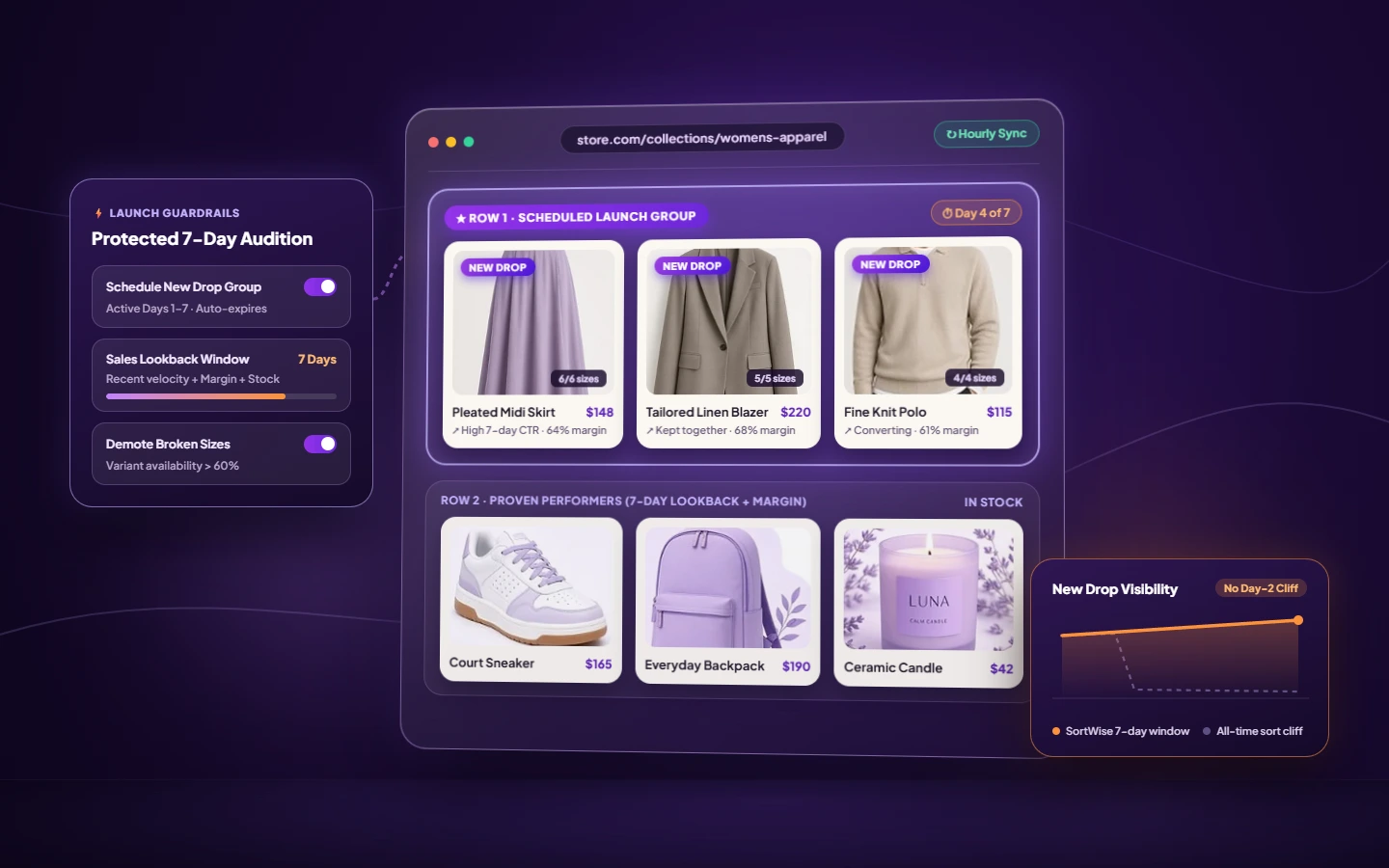
- Schedule a launch group with an expiration date. Instead of flipping the whole collection to Newest, define a New Products group (for example, published within the last 7 days) or use Collection Scheduling to set an exact start and end window for the drop. While the window is live, the launch group leads. When it expires, the group steps aside automatically and products flow into the collection’s everyday sort.
- Switch from all-time volume to a 7- or 14-day lookback. A new arrival cannot beat three years of order history, but it can compete on this week’s demand. Rank your main product body using a custom 7-, 14-, or 30-day lookback blended with profit margin and conversion. When a new product converts well during its launch window, its recent momentum keeps it near the top naturally after the scheduled window ends.
- Keep the capsule together and frame the drop in-grid. If the launch is a coordinated outfit — a linen blazer, matching trouser, and knit polo — use Product Grouping with Preserve Group Order so the pieces appear side by side instead of scattering across the page. Then place an inline Collection Banner beside the group to introduce the launch story right inside the product grid.
- Protect variant availability from hour one. Nothing stalls a launch faster than a hero piece selling out of Medium and Large in the first six hours while staying pinned in slot one all weekend. Hourly automated sorting with inventory-aware merchandising and variant availability rules ensures broken-size items step back before they burn paid clicks.
Audit the launch window after seven days
When the launch window closes, do not guess which new SKUs earned their keep. Check two signals in Collection Analytics:
- Visibility waste: Which new products occupied top-12 slots during launch week without earning clicks or orders? Let the hourly sort demote them so proven high-margin movers reclaim the space.
- Buried winners: Did a secondary colorway or unpinned launch item quietly post a strong click-through and conversion rate lower in the grid? Promote it into the first rows while demand is warm.
If your team is debating how many slots to reserve for newness versus proven bestsellers, test both strategies head-to-head on live traffic in the Strategy Lab A/B testing tool and keep the order that lifts revenue per collection view.
Stop choosing between fresh collections and converting collections
Native Shopify sorting forces a false choice: sort by Newest and risk lower conversion on your core categories, or sort by Best selling and bury every new product the day after it launches.
With SortWise Collection Sort , you can give new arrivals a scheduled audition, rank on 7-day momentum instead of all-time history, frame the drop with an inline banner, and let hourly rules keep every row shoppable.
Keep reading
All articles
Why the Top 3 Rows of a Shopify Collection Make the Sale
Learn how product position, availability, demand, profit, and testing work together to build better Shopify collection pages. Read article
Best Shopify Collection Sorting Apps in 2026
Compare collection sorting apps by collection banners, merchandising controls, analytics, automation, and pricing. Read article